
Why is it so hard to evaluate a software launch before you buy?
A new software launch lands on JVZoo or WarriorPlus almost every day, and most sales pages promise the same thing: one click, no skills needed, a result by tonight. Learning how to evaluate a software launch before you buy is the only way to tell them apart, because the sales page is written to sell, and the real terms sit elsewhere.
Skip that step and the cost shows up after checkout. It looks like an upgrade you bought and never opened, a tool that needs a paid API key the page never mentioned, a license that does not cover client work, or a refund window that closed while you were still setting things up.
This guide gives you a method you can apply to any launch in about twenty minutes: read the funnel, price every OTO, check the refund and license terms, and spot the claims that deserve doubt.
It is also the method behind our own reviews. How we test and score each product is described on our review methodology page, and every review we publish applies the checks below.
How does a JVZoo or WarriorPlus launch funnel work?
Most software launches on these marketplaces follow the same structure, called a funnel: a sequence of offers you see one after another, starting at checkout. Knowing the vocabulary is the first step, because each word hides a different decision.
| Term | What it means | What to check |
|---|---|---|
| Front end (FE) | The entry product, at the lowest price in the funnel | What it actually lets you do, with its limits |
| OTO (one-time offer) | An upgrade shown right after you buy the front end, often OTO 1 to OTO 5 or more | What each OTO adds, and whether you need it now |
| Upsell | Any higher-priced offer added after the first purchase | Whether it is one-time or recurring |
| Downsell | A cheaper version of an OTO, shown if you decline it | What was removed to lower the price |
| Bundle deal | The front end and all OTOs sold together at one price | Whether you would use most of what it includes |
| Launch window | The few days of the launch, often with a special price | What the price becomes after the window closes |
| Early-bird price or coupon | A discount for the first buyers or with a code | Whether it applies to the OTOs too |
The funnel is designed so that the front end looks cheap and the OTOs look necessary. Both can be true at once. Your job is to decide which OTOs serve your goal before you see them, not while a countdown runs on the screen.
One practical habit helps more than any other: open the vendor's JV page or funnel page when it is available, and write down every offer and its price before launch day. You will then face each OTO with a decision already made.
Is the front end enough, or do you need the OTOs?
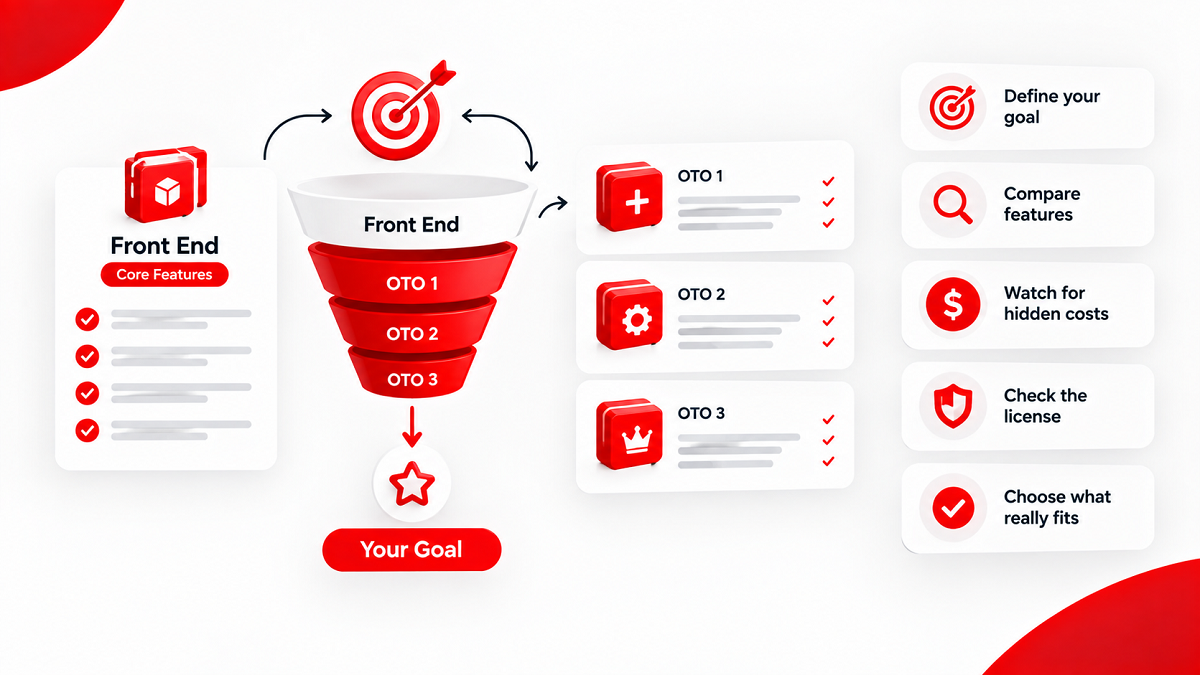
The honest answer depends on what you want to produce, not on what the OTO page says. Start with your goal in one sentence, such as "five short videos a week for my own channel" or "landing pages for three clients", then check which offer in the funnel is the cheapest one that reaches it.
Compare what each level unlocks, feature by feature:
- List the features you need for your goal, and nothing else.
- Mark which ones the front end includes, and with which limits: projects, credits, exports, resolution, number of accounts.
- For each OTO, write what it adds that you would use in the next thirty days.
- Ignore any OTO whose only benefit is "more" of something you have not used yet.
What to watch:
- A feature presented on an OTO page may already exist in the front end under another name. Compare the dashboards or the feature lists, not the marketing headlines.
- "Unlimited" often means unlimited projects but capped credits. The credit cap, not the project count, decides how much you can really produce.
- Some OTOs are recurring, billed monthly or yearly, even inside a funnel sold as "one-time". Read the price line under each button.
- An OTO that unlocks a license, such as commercial or agency rights, is a different decision from an OTO that adds features. Judge it separately (see the license section below).
The front end is often enough to find out whether the tool works for you. You can usually upgrade later, sometimes at a higher price, but a higher price for an upgrade you know you need beats a lower price for one you never use.
How do you calculate the real total cost of a launch?
The front-end price is the entry ticket, not the cost. The real total includes every upgrade you plan to buy and every outside service the tool needs to work. Many AI and video tools, for example, depend on a paid account elsewhere.
| Cost line | Where to find it | Question to ask |
|---|---|---|
| Front end | Sales page and checkout | Is this the launch price, and what does it become after the launch window? |
| Each OTO you need | Funnel or JV page | Is it one-time or recurring? |
| API key or credits | FAQ, documentation, fine print | Do I need my own paid account with an AI, voice or data provider? |
| Hosting | Setup instructions | Does the tool host my pages or files, or do I need my own hosting? |
| Autoresponder or other integrations | Integrations list | Which paid service must I connect to use the main feature? |
| Future fees | Terms and FAQ | Are there monthly server, maintenance or "pro" fees after year one? |
Hosting is the hidden cost we see most often. A tool that publishes pages to your own server needs a hosting plan, and that plan has its own renewal price. Our guide to web hosting for affiliates and agencies explains how to price it over several years.
Add the lines up over twelve months, then ask one question: would you still buy at that total? If the answer is yes, the launch price is a real saving. If not, the front end was never the real price.
If you want our hands-on verdicts on new launches as we publish them, the AdminToolz bonus pack signup is where we collect readers who want them.
Who handles refunds on JVZoo, and what should you check first?
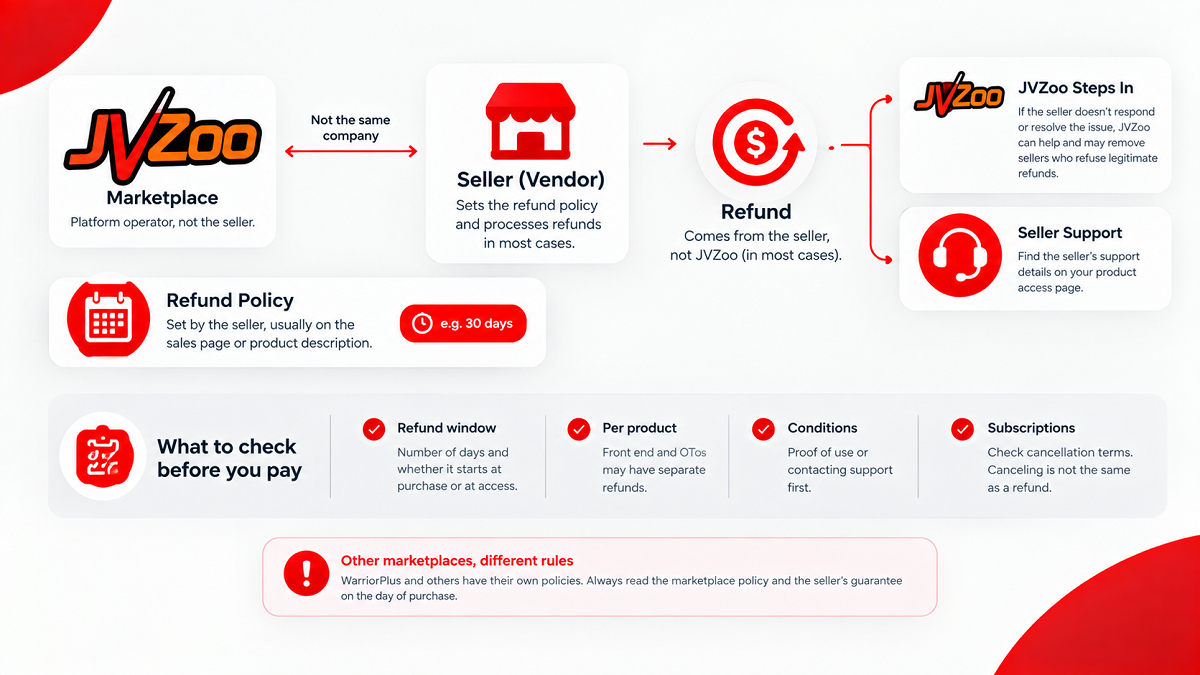
Refunds are where most buyers make assumptions, and where a few minutes of reading save the most money. The key point is that the marketplace and the seller are not the same company.
The seller sets the refund policy
JVZoo's Terms of Use (checked September 30, 2026) describe JVZoo as a platform operator that is not a party to the transaction between the vendor and the customer, except where its terms say otherwise. In practice, the refund period and its conditions come from the seller, usually stated on the sales page or in the product description. Find that statement before you buy and note the number of days.
Who processes the refund
According to JVZoo's help center (checked September 30, 2026), JVZoo can process a refund only when it accepted the payment on the seller's behalf. In most cases, the payment goes directly to the product owner, so the refund request goes to the seller, whose support details appear on the product access page of your JVZoo customer account.
If the seller does not answer, you are not on your own. In a January 2026 post on how JVZoo protects buyers, the marketplace says it steps in when a seller does not respond or does not resolve an issue, and that sellers who refuse legitimate refunds can be removed from the platform.
What to check before you pay
- The length of the refund window, in days, and whether it starts at purchase or at access.
- Whether the refund applies per product. Refunding the front end does not always refund the OTOs bought with it, so each purchase may need its own request.
- Any conditions, such as proof that you tried the product or contacted support first.
- For subscriptions, the cancellation terms. JVZoo's Terms of Use place the responsibility for reviewing cancellation and billing terms on the buyer, and canceling a subscription is not the same as requesting a refund for charges already made.
WarriorPlus and other marketplaces have their own rules. Read the policy of the marketplace you actually buy on, and the seller's own guarantee, on the day of purchase.
Commercial, agency, white label or reseller: what does each license allow?
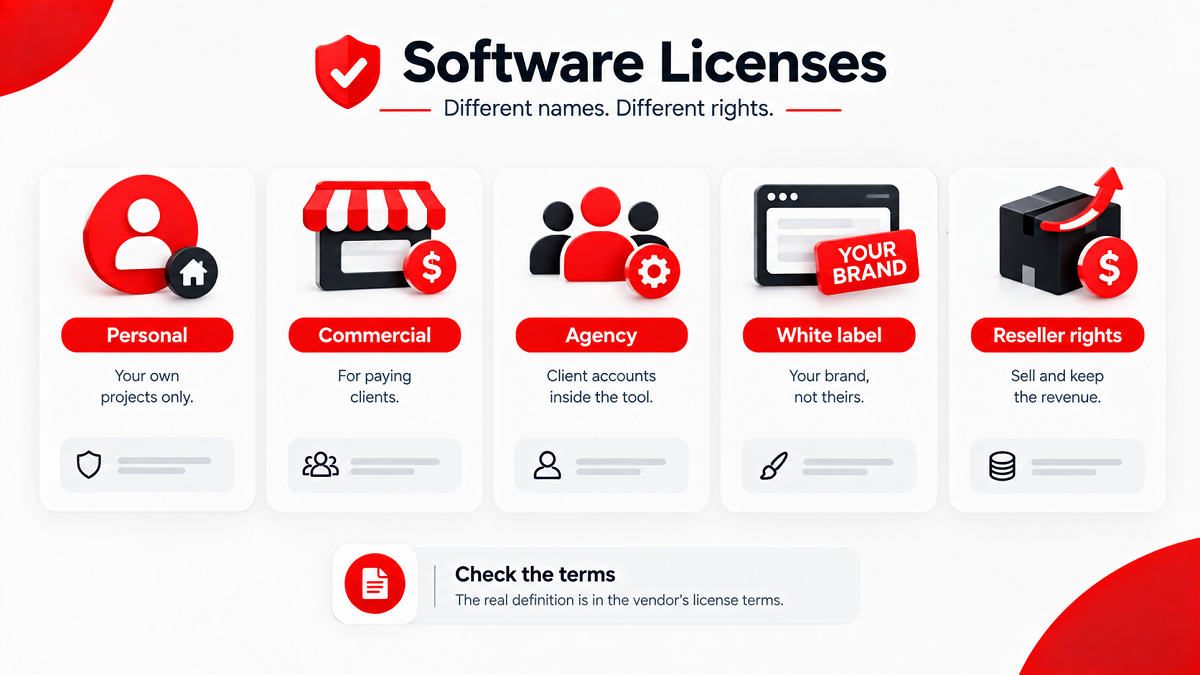
License upgrades are among the most misunderstood offers in a launch funnel. The names sound similar, but they answer different questions: can you use the output for clients, can you sell the software itself, and under whose brand?
| License | What it usually covers | What to confirm in the terms |
|---|---|---|
| Personal | Your own projects only | Whether your own business sites count as personal use |
| Commercial license | Using the output (videos, pages, images) for paying clients | Any limit on the number of clients or projects |
| Agency license | Giving clients their own accounts or access inside the tool | How many client accounts, and who pays for their usage |
| White label | Presenting the tool or its output under your own brand | Whether your domain and logo replace the vendor's everywhere |
| Reseller rights | Selling the software itself and keeping the revenue | How many copies, at what price, and who supports your buyers |
The table shows what these labels usually mean. The only definition that counts is the one in the vendor's license terms, and two vendors can use the same word for different rights. If the terms are not written down, ask support before you pay, and keep the answer.
What to watch:
- A commercial license on the output does not mean you own the rights to everything inside it. Templates, stock media, music or AI output can carry their own terms.
- Tools that publish to YouTube, Meta or Google depend on those platforms' rules, which the vendor cannot change for you.
- Reseller rights make you responsible for your buyers. If the vendor closes, your customers will contact you.
For an agency, the license is often the only OTO that truly matters. For a solo affiliate working on their own sites, it is often the first one to skip.
How do you spot income claims, fake scarcity and inflated bonuses?
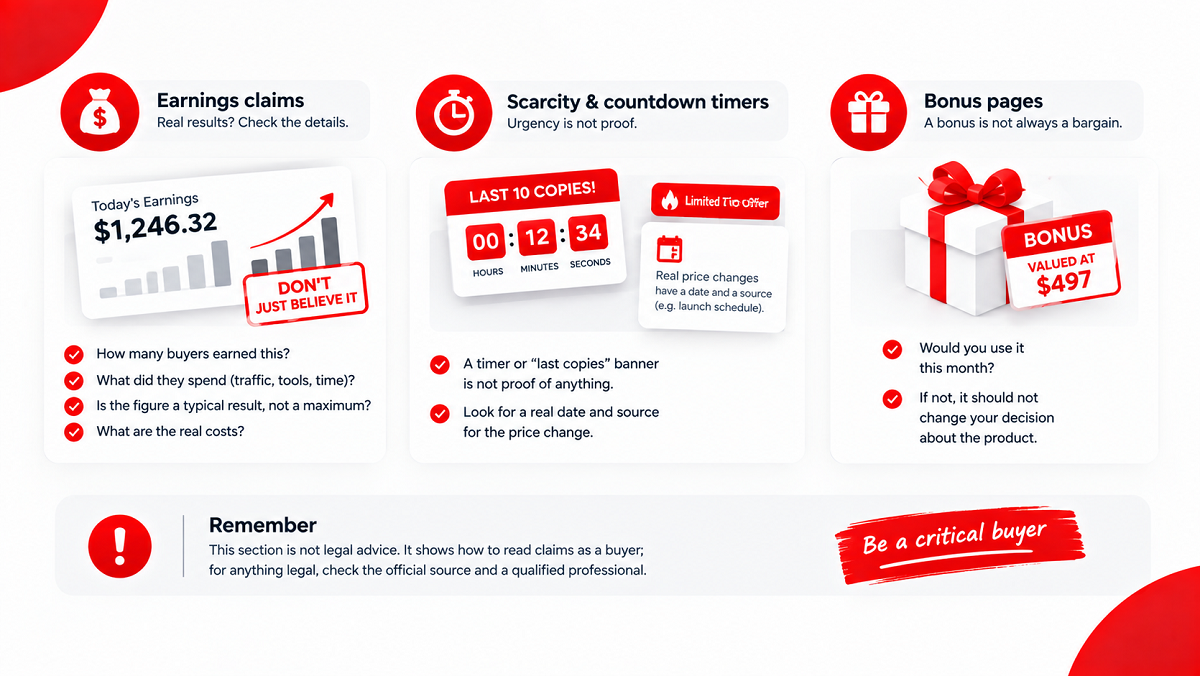
Many launches in this market are sold on results rather than features: a screenshot of daily earnings, a promise of free traffic, a timer that says the price doubles tonight. These claims deserve the most doubt, because they are the hardest to check before you pay.
Earnings claims
When a product is sold as a way to make money, the FTC's Notice of Penalty Offenses Concerning Money-Making Opportunities (checked September 30, 2026) offers a useful lens. It lists as unfair or deceptive, among other practices, showing earnings figures without clear context such as the share of participants who reach them and the amount typically made, and misrepresenting earnings by leaving out the expenses the participant has to pay.
Read an income screenshot with those questions in mind. How many buyers earned that? What did they spend on traffic, tools and time? If the page does not say, the figure tells you nothing about your own result. AdminToolz never repeats an earnings claim as a fact, and our disclaimer explains why.
Scarcity and countdown timers
The same FTC notice also lists as deceptive misrepresenting that a money-making opportunity will be sold to only a limited number of buyers. A timer or a "last copies" banner is not proof of anything. A real price change has a date and a source, such as the launch schedule published by the vendor. If you cannot find one, treat the timer as design.
Bonus pages
Bonuses can add real value, but a bonus "valued at" several hundred dollars is a price nobody paid. Judge a bonus by one question: would you use it this month? If not, it should not change your decision about the product itself.
This section is not legal advice. It shows how to read claims as a buyer; for anything legal, check the official source and a qualified professional.
Cloud, desktop, lifetime deal or subscription: what happens after launch?
A launch lasts a few days. The software has to work for months. Before you buy, look past the launch week and ask what the product will look like a year from now.
- Cloud-based tools run on the vendor's servers. Nothing to install, but the tool works only as long as the vendor keeps those servers running.
- Desktop software runs on your computer. Check which operating systems it supports, and whether it still needs an online account or license check.
- A lifetime deal usually means the lifetime of the product, not yours. Read what "lifetime" covers: updates, support, credits, or only access.
- A monthly or annual plan costs more over time, but a vendor with recurring revenue has a reason to keep the product running and updated.
Look for signs of a product that will last: a public roadmap or changelog, documentation beyond a single video, a support channel with a stated response time, and earlier products from the same vendor that are still online. None of these is a guarantee, but their absence is a warning.
A checklist to evaluate a software launch before you click buy
Run this list every time you evaluate a software launch. It takes about twenty minutes and replaces most of the time spent on sales pages and countdown timers.
- Write your goal in one sentence: what you want to produce, for whom, and how often.
- List every offer in the funnel with its price: front end, each OTO, downsells, bundle.
- Mark the cheapest offer that reaches your goal.
- Check whether each OTO is one-time or recurring.
- List every outside service the tool needs: API key, voice provider, hosting, autoresponder.
- Add up the real cost over twelve months.
- Find the refund window in days, and whether it covers each OTO separately.
- Note who processes refunds: the marketplace or the seller.
- Read the license terms if you plan to use the output for clients.
- Treat any earnings screenshot as unverified unless typical results and expenses are disclosed.
- Check whether the countdown or the "limited copies" claim has a dated source.
- Look for signs the product will still exist in a year.
A launch that passes these twelve points is worth considering on its merits. A launch that fails the cost, refund or license points usually costs more than the launch price suggests.
Where to go next in our launch guides
This page is the starting point of our guides on how to evaluate a software launch. Each guide we add here will answer one of these questions in detail, and every product review we publish applies the same checks to a real launch, with the full funnel priced. You can browse the tools we have already reviewed in all AdminToolz reviews, and follow new guides in the Launch Guides category.
Whatever you buy, the vendor's sales page, the refund terms and the license terms on the day of purchase outrank anything written here. Check them there before you pay.
Everything in this guide
1 in-depth page covering each part of the topic.